Extending Player Behavior
Note
You can find the complete source code for this tutorial in the Flight Ability system of the System Template Examples respository.
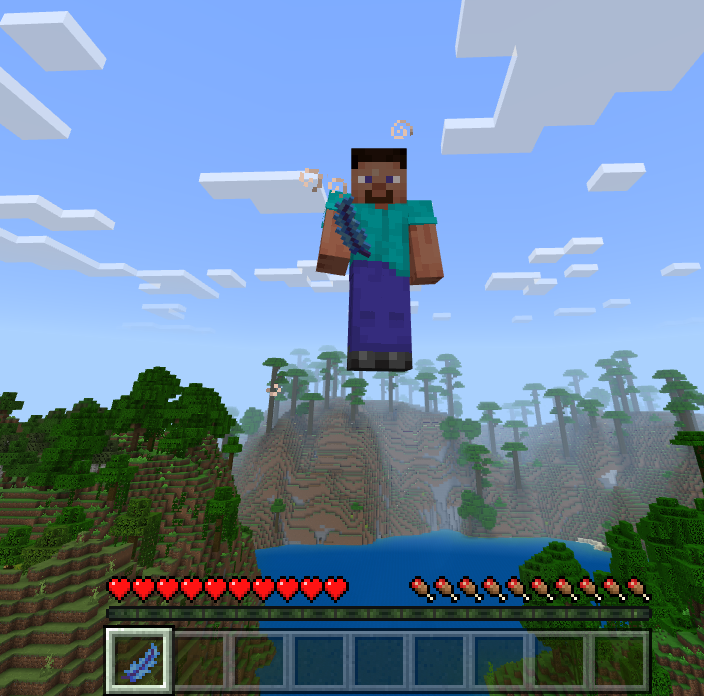
This tutorial demonstrates how to extend player’s behavior using System Template. We’ll create a simple custom item called “Magic Feather” that enables players to fly by pressing the sneak button while holding the item. The flying logic is implemented in a behavior pack animation controller and added into the player behavior.
System File Structure
📁 flight_ability
    🗒️ _map.py
    🗒️ _scope.json
    🗒️ item_texture.json
    🗒️ magic_feather.bp_item.json
    🖼️ magic_feather.item.png
    🗒️ player.behavior.json
    🗒️ player.bp_ac.json
System Configuration
The system’s configuration is defined in the _scope.json and _map.py files.
_scope.json
{}
This system doesn’t use variables; the scope is an empty object.
_map.py
[
    # Player beahvior
    {
        "source": "player.behavior.json",
        "target": AUTO_FLAT,
        "on_conflict": "merge"
    },
    {
        "source": "player.bp_ac.json",
        "target": AUTO_FLAT,
        "on_conflict": "merge"
    },
    # Custom item
    {
        "source": "magic_feather.bp_item.json",
        "target": AUTO_FLAT
    },
    {
        "source": "magic_feather.item.png",
        "target": AUTO_FLAT
    },
    {
        "source": "item_texture.json",
        "target": "RP/textures/item_texture.json",
        "on_conflict": "merge"
    }
]
Most files utilize auto mapping to define their destination. The exception is the item_texture.json file. The default auto_map.json file doesn’t map unique resource pack and behavior pack files (like sound_definitions.json, item_texture.json, etc.).
The player behavior, animation controller, and the item_texture.json file use the “merge” option. Thanks to the merging, multiple systems can modify the same files.
System Files
item_texture.json
{
	"resource_pack_name": "pack.name",
	"texture_name": "atlas.items",
	"texture_data": {
		"magic_feather": {
			"textures": "textures/items/magic_feather"
		}
	}
}
This file is merged with the one in the resource pack (if it exists).
magic_feather.bp_item.json
{
	"format_version": "1.20.0",
	"minecraft:item": {
		"description": {
			"identifier": "nusiq:magic_feather",
			"category": "Nature"
		},
		"components": {
			"minecraft:max_stack_size": 1,
			"minecraft:icon": {
				"texture": "magic_feather"
			}
		}
	}
}
Note
When defining an item, it’s usually advisable to also define its name in the language file. This system doesn’t do that. The project uses Name Ninja Regolith filter instead. Name Ninja handles creating item names for all items in the project.
magic_feather.item.png

player.behavior.json
{
	"format_version": "1.18.20",
	"minecraft:entity": {
		"description": {
			"animations": {
				"flight_ability_controller": "controller.animation.player.flight_ability"
			},
			"scripts": {
				"animate": ["flight_ability_controller"]
			}
		}
	}
}
The player behavior file contains only information related to the system and is not a valid behavior file on its own. It should be merged with the vanilla player behavior file. Adding this system to the project is not sufficient to make it work; you also need to copy the vanilla player behavior file to your behavior pack, placing it in the same location as the target path of the player.behavior.json file of this system (into BP/entities/player.behavior.json). Alternatively, you could add a vanilla player behavior file to the system and use the "skip" option in its "on_conflict" field. This way, the system would only add the file if it doesn’t exist in the project yet. However, this approach is not recommended because it would mean that every system modifying the player behavior would have to include the vanilla player behavior file. It’s better to manually add it to the project’s behavior pack.
Merging files doesn’t overwrite arrays; it appends values to them. If the player behavior of the project already has a minecraft:entity->description->scripts->animate array, this system will append "flight_ability_controller" to it. This means that multiple systems can add their animations and animation controllers without interfering with each other.
Note
If you’re designing your systems carefully, you can also merge components like "minecraft:damage_sensor" or "minecraft:environment_sensor". Just ensure that the "triggers" argument of the sensor is an array and not an object (otherwise, System Template won’t merge the triggers properly).
When your systems build sensor components, remember to review the generated file. The order of the triggers and their filters is often important. Also, make sure that multiple systems don’t add multiple sensors to different component groups simultaneously. The best way to solve this is to use the sensors only in the main components list and make their filters specific enough to avoid accidental triggers when the behavior is running.
player.bp_ac.json
{
	"format_version": "1.20.30",
	"animation_controllers": {
		"controller.animation.player.flight_ability": {
			"initial_state": "default",
			"states": {
				"default": {
					"transitions": [
						{
							"flight": "q.is_sneaking && q.is_item_name_any('slot.weapon.mainhand', 'nusiq:magic_feather')"
						}
					]
				},
				"flight": {
					"transitions": [
						{
							// Always loop back, keep repeating while the player is sneaking with the feather
							"default": "1.0"
						}
					],
					"on_entry": [
						"/effect @s levitation 1 5 true",
						"/effect @s slow_falling 5 0 false"
					]
				}
			}
		}
	}
}
Other Files Required By The System
As mentioned before, this system expects the vanilla player behavior to be present in the project. Copy it from the vanilla behavior pack to BP/entities/player.behavior.json.